Published On: February 2, 2026 | Last Updated: February 22, 2026
Estimated Reading Time: 5 mins
Gmail Phishing Threat Signals: A Real-Life Detection Walkthrough & Resolution I’ve Implemented
Most phishing attacks don’t happen in the dark; they happen in the middle of your busiest afternoon. Before and while navigating a recent digital siege, I encountered several Gmail phishing attempt so sophisticated it bypassed standard filters.
This isn’t a theory from a textbook; this is a walkthrough of how I detected the ‘Spirits’ in my inbox and the exact resolution I implemented to neutralize the threat before a single byte was compromised. so you have something to help you scale this similar challenges”
Are you ready? Let’s paddle on,
![Gmail Phishing Threat Signals: A Real-Life Detection [E.E.A.T Guide]](https://ccndigit.com/wp-content/uploads/2026/02/Gm.png)
The Siege Entrance: Identifying the “Anomalous” Signal
Phishing doesn’t always look “broken.” Sometimes it looks exactly like a system notification designed to trigger panic. In my case, the message used a psychological trigger regarding account security to force a quick, unthinking click. See below some series of phishing screenshot sample i do receive
Screenshot of some Phishing Mail Highlight

The Phishing mail Header Part
Below Screenshot was one of my general scanning

Signal 1: The “Ghost” Sender Address (Metadata Audit)
The display name said “Google Gemini, LinkedIn Security in the mail, and related other strong brand,” but the metadata told a different story. By hovering over the sender’s name, I revealed a domain that had no association with the official gatekeepers.
When a message has this kind of spirited screenshot Link , please be cautious. If you still want to proceed, please proceed with highest caution I warned and repeat. When it has a Juicy link with too sweet to believe words of things you aren’t expected. Please, it’s a RED SIGNAL in the first place , things like the below screenshot

Additional Spirits phishing screenshot below that mimics the Google Gemini brand while I’m operating on Telegram …
Signal 2: The “Poisoned” Link URL
The “Hover-and-Verify” protocol is your best defense. Never click; always inspect. I examined the destination URL hidden behind the “Verify Now” button and found it led to a credential-harvesting site.
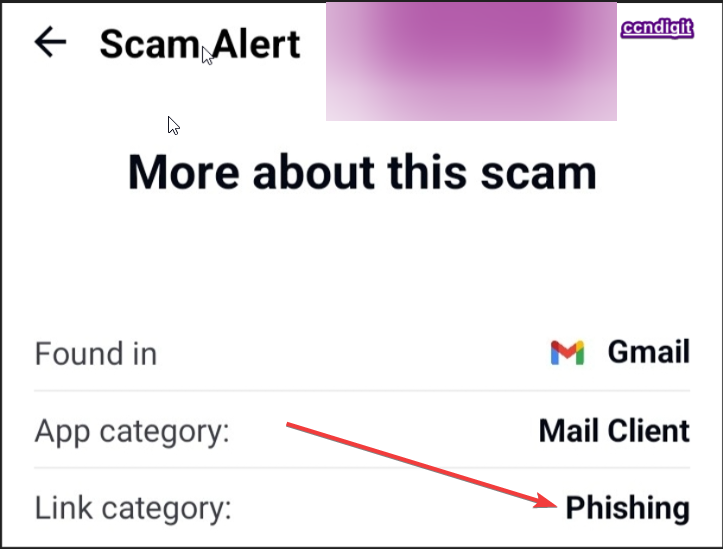
Well, capturing that “Hover-and-Verify” moment wasn’t feasible to get here tohelp you have that visual insight as well but in the physical sight when juicy links with too sweet to believe also suddenly arrive or you’re not expecting it , please be careful with the so call Phishing link like below again

The Neutralization Protocol: How I Resolved the Threat
Neutralization requires more than just deleting the email. To harden the perimeter for myself and the community, I implemented the following steps:
Reporting as Phishing: I utilized Gmail’s internal tools to flag the message, training the AI to recognize this specific signature. See screenshot visual below to move you beyond theories

Security Checkup: I performed a manual audit of all active sessions to ensure no “Ghost” sessions were active. See visual screenshot below

Credential Hardening: Even though I didn’t click, I treated the event as a signal to review my password and 2FA health.
Global Phishing Defense: International Best Practices & Reporting Hub
Phishing is a borderless crime. To provide a hassle-free experience for my global audience, I have curated this directory of high-authority resources. Use this table to report incidents in your specific region.
Region / Country | Authority / Organization | Direct Resource Link | Focus Area |
Global (Google) | Google Safety Center | support.google.com/phishing | Reporting & Ecosystem Protection |
United States | CISA / FBI (IC3) | cisa.gov/report | Phishing & Cyber-Crime Reporting |
United Kingdom | NCSC (Action Fraud) | ncsc.gov.uk/phishing | Reporting Phishing Emails & SMS |
Nigeria | NITDA / NCC | cert.gov.ng | Cyber-Incident Response (ngCERT) |
European Union | ENISA / Europol | europol.europa.eu | Cross-Border Cyber Defense |
Canada | CCCS | cyber.gc.ca | Canadian Centre for Cyber Security |
Australia | ACSC | cyber.gov.au | Cyber Security Hotline & Reporting |
Read Related- Google Ecosystem Performance: My 41.67 Jump Growth Strategy
![Gmail Phishing Threat Signals: A Real-Life Detection [E.E.A.T Guide]](https://ccndigit.com/wp-content/uploads/2026/02/Red-Simple-No-War-Peace-Instagram-Post-5.png)
About Gmail Phishing Threat Signals: A Real-Life Detection Walkthrough & Resolution I’ve Implemented [E.E.A.T Guide]
Phishing is the ‘Social Engineering’ wing of digital warfare. My experience neutralizing this specific threat proves that your human intuition, backed by Google’s security signals, is your most powerful asset.
As I continue to harden my own perimeter during this ongoing siege, I urge you to implement these detection steps immediately.
Don’t wait for a breach to become an Architect—start building your defenses today and most importantly ensure to implement Google Security best practice your stronghold , the Google Neutralization given to you above , also enure to walkthrough the Google Phishing resource I display in this post table above and other high authorities reporting means i also features here .
Even as I write this, the technical loop continues—proving that security is not a one-time setup, but a continuous tactical defense.
Above all, Master Google Ecosystem here
Implement other E.E.A.T Base Digital and Online Survival Guide here


![Read more about the article IS ONLINE MONEY-MAKING WORTH THE HYPE? My Experience VERDICT Plus Tips To Help You Scale Success [ Updated Version ]](https://ccndigit.com/wp-content/uploads/2024/04/content-is-king_53876-92759.jpg)